
Where does the live auction take place?
The live auction takes place on the philasearch.com website. To participate you need to register both on the Philasearch platform and for the specific auction by Stampcurio.
Create or log in to your Philasearch account
If you don’t yet have a Philasearch account, click the Register menu item (see Figure 1), and create your user account.
If you already have a Philasearch account, log in to the Philasearch site.
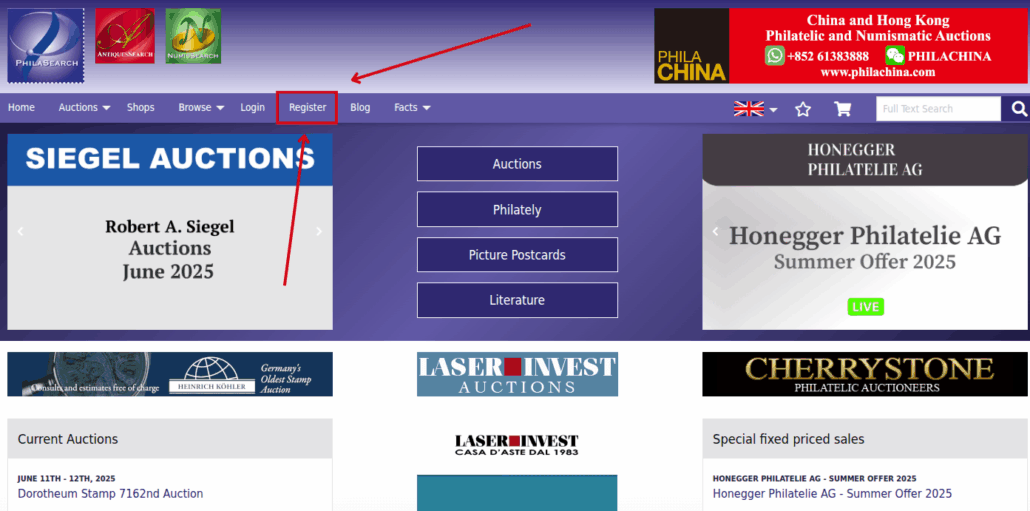
Figure 1: Use the Register menu item to register for a Philasearch user account
Navigate to live auctions
In the main menu, select “Live Auctions” (see Figure 2), then locate the auction hosted by Stampcurio.
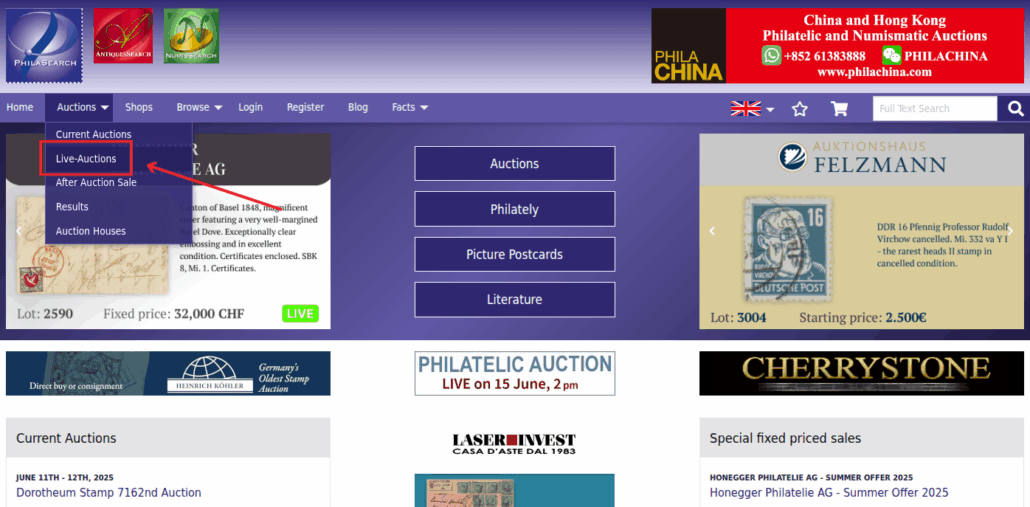
Figure 2: After logging in, the Philasearch live auctions are accessible via the Live Auctions button
Registering for the Stampcurio auction
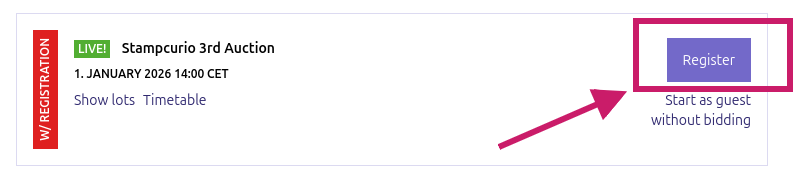
Figure 3: Use the Register button to sign up for a given auction
On the Live Auctions page, click the Register button (see Figure 3), then click Start registration… to begin the process (see Figure 4).

Figure 4: Click the Start registration … button to begin the registration process
Enter the required information
Fill in the data requested by Philasearch and accept the terms of use. After submission, you’ll receive a confirmation email from Philasearch (see Figure 5).
Important: this confirmation simply acknowledges receipt. Final approval is granted separately by Stampcurio — only after their acceptance are you cleared to bid.

Figure 5: After registration, the following page appears
Confirmation and timing guidelines
Stampcurio reviews registrations individually. We strongly recommend submitting your application at least 24 hours before the auction begins to ensure timely approval. Only confirmed registrations will be allowed to join the live auction.
Bidding limit (credit limit)
New participants are automatically granted a 10,000 EUR credit limit — this is the maximum you may bid by default.
If you wish to bid more than this amount, please contact us via the channels provided on stampcurio.com. Upon request, and based on review, your bidding limit may be raised.
Tip: request any credit-limit increase well before the auction date to ensure approval in time.
Entering the live auction
After receiving confirmation, return to the Live Auctions list, open the Stampcurio auction, and click the Start bidding button (see Figure 6).
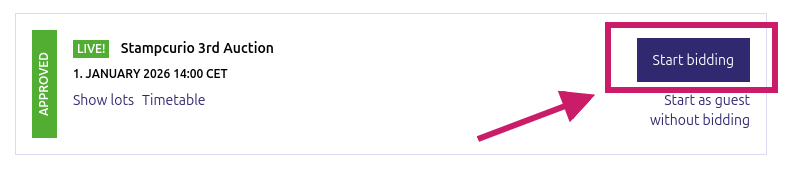
Figure 6: Once registration is confirmed, the Start bidding button opens the live auction
Auction schedule and timing
If upon login you see that the auction has not yet started, is paused, or has ended, check the “Starting Time” column (see Figure 7). Times are displayed according to the time-zone set in your Philasearch profile.
We recommend logging in early to avoid missing any lots — the auction typically proceeds at about 100 lots per hour.
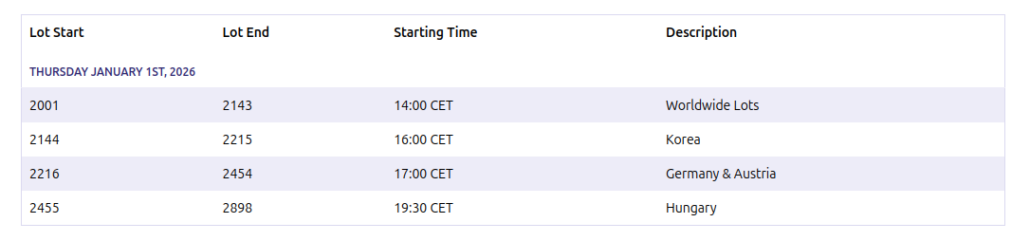
Figure 7: The auction has not started yet, is paused, or has already ended
Bidding process
During the auction you may only use the bid increments defined in the Terms of Use. To bid, click the green Bid buttons (see Figure 8).
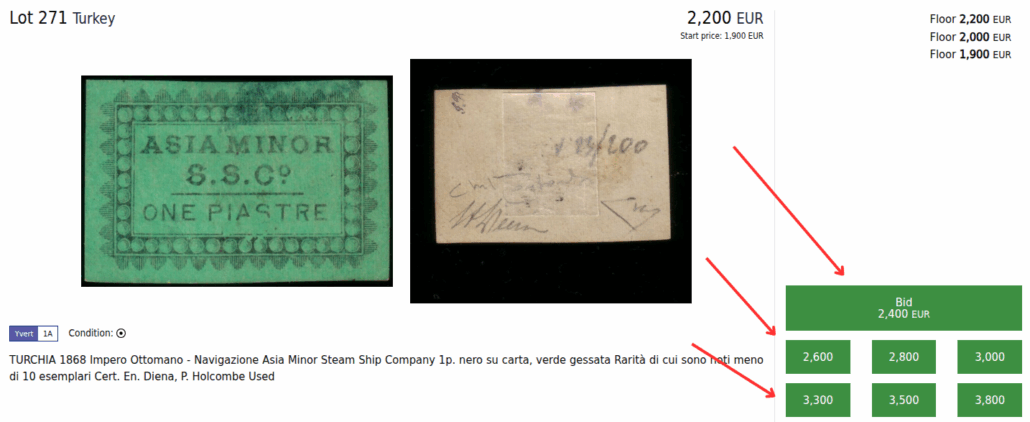
Figure 8: Opportunity to place a bid
When the buttons turn yellow (see Figure 9), this is the final warning before the hammer falls — bids placed at that moment are still valid. If multiple bids arrive at the last moment, the interface resets to allow further bids.
Tip: avoid last-second bidding! Occasionally the system processes these late bids late and the lot may close before they are accepted.
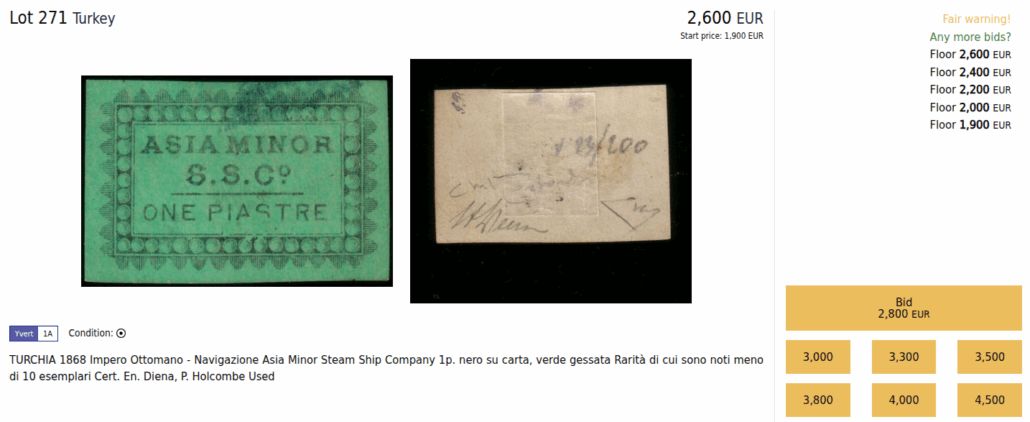
Figure 9: Last chance to bid before the lot is hammered
Viewing your bids and auction results
During and after the auction, you can view your bids and the results under “MyPhilasearch”. Within 2–3 business days after the auction, you will receive the final invoice.
Telephone bidding (optional)
If you prefer to bid by phone, this option is available. Please request telephone bidding at least 24 hours before the auction starts, using one of the contact methods listed on stampcurio.com.
Frequently asked questions (FAQ)
1) Do I need to register separately for the Stampcurio auction if I already have a Philasearch account?
Yes. A Philasearch account alone is not sufficient — you must also complete the registration process specifically for the Stampcurio auction.
2) When will I receive final confirmation?
After your application is reviewed and approved by Stampcurio. Therefore, we recommend applying at least 24 hours before the auction.
3) Why can’t I bid yet?
Possible reasons: your registration hasn’t been approved yet, or the auction hasn’t started / is paused / has already ended.
